
 Top 10 Home Theater Audio OptionsSome people might not understand why a man needs a special place at home to call his own. Yes, the man cave. You see, in the man cave a man gets to relax and unwind the day’s stress without the bother of his spouse or children, and have time with his buddies.
In addition, to know the man`s cave in a house look for these features; pool table, video game, TV, Home theater, and bar. However, a good music system is a key feature. Herein are top ten Home theater audio systems that men should look for. The Bose CineMate 130 Home Theater Audio SystemBose is a leading manufacturer of subwoofers and speakers, the CineMate130 features; Wi-Fi and wireless acoustic surround and lastly the remote control feature. Price $1,499 Panasonic BTT465 RMS Home Theater Audio The device has a smart network technology that allows all types of devices to be easily integrated. Also, you get to enjoy wireless music from any Bluetooth enabled device. Price $700 1000W 5.1 Channel Samsung Music System This unique system is compatible with almost all Samsung apps, and it tops the list since it has both center and front speakers that give quality sound. Naturally, the HDMI function allows transmission of video signals and its incredible 1000 w power capacity. Price $549. 5.1 Channel Onkyo HT-S3500 Home Theater Audio System This system has 4 HDMI ports that can be connected to any TV or computer to give high-quality images. It also has audio return channels and a WRAT Amp that produce quality sound. Price: $435. 5.1 Channel Samsung H5500W home Theater Audio System Samsung never disappoints when it comes to home electronics; this audio system gives you high definition audio that comes un-distorted. In addition, the home theater also allows access to the music hub, online apps, and even games. The rear speakers are wireless, and it retails at $400. 5.1 channel 3D Sony BDV-E3100 This Home theater is Bluetooth enabled, has inbuilt Wi-Fi and has superior sound quality. The Wi-Fi system allows you to connect to the online music hubs where you can stream music live and get to enjoy it. The Bluetooth feature, on the other hand, allows you to stream music directly from any Bluetooth enabled devices. It retails at $300. Yamaha NS-P40 It is a 5.1 channel music system which offers High Definition sound and a linear port that allows regulation of bass. Its subwoofer has an output of 50 watts. The subwoofer has been integrated in such a way that it provides smooth quality sound. Price $230 The Sony Micro CMTSBT 100 Music System This is another advanced device that is produced by the home of electronics, Sony. The system produces a dynamic and very powerful audio that is one of a kind. The Bluetooth feature also allows streaming and has one-touch listening feature. Price $198 Acoustic AA5170 Home Theater Audio System For the price, we thought to include Acoustic AA5170 to our top 10 home theater audio options. It has a power rating of 700 W and five different channels that one can choose from. Its frequency ranges from 20Hz to 20 kHz, and it falls under the top 3 category. Price $104 RTD396 RCA DVD Audio System This system is also a 5.1 channel surround music system, and with its high-performance subwoofer you are assured of rich sound delivery, and the cable connecting speakers have different colors. Plus, an input jack at the front allows you to play music from your mobile devices. Price: $92.20 All in all, there you have it folks. Cinema System’s pick for top 10 home theater audio options.
0 Comments
 HOME THEATER SURROUND SOUND SETUP FOR PROJECTORSFor a quality home theater surround sound, you should set up a surround speaker system so that the sound reaches the audience in the best quality possible. Projectors are a versatile way to amplify the image at home, at the office, in cinema halls and when making any presentation. For example, projectors work with TV boxes, Laptops, gaming consoles and digital motion images over a network.
SURROUND SOUND SETUP IN LARGE ROOM SETTINGSIn a theater configuration (used in large halls and cinemas) there is a multi-speaker setup and multi-channel recording where speakers are placed strategically across the room to recreate most sound sources. As a result, the audience receives a combination of signals emanating from different corners of the room. In large halls, the front of hall loudspeakers is placed on the right, left, and at the center front of the hall facing the audience. Especially relevant the surround speakers are placed in the middle of the sidewalls. They may also be placed at equal intervals from the front to the back at an angle of 45 degrees from the wall. Distributed loudspeakers are ceiling mounted at an angle of 30-45 degrees to the ground at strategic locations to enhance sound for the middle and rear seating. The surround system also requires mixing consoles, signal processors, and amplification systems to enhance the quality of the signal. SMALL ROOMS AND LIVING ROOMSHome theaters are commonly used in small rooms and living rooms. Almost all of them come in the configurations of 5.1 and 7.1 sound standards. While the 5.1 surround is the most popular, it has five speakers and subwoofers. The 7.1 surround has seven speakers along with the subwoofers. THE SETUPFirst of all, place the center channel speaker pointing directly to the ears height of the audience. For an ideal home theater surround sound setup, it should be at least two meters away. The front left and right speakers should be placed at an ear’s height and produce 45 degrees angle when viewed from the seating. Ultimately, this helps in precise delivery of the sounds. The surround right and left speakers should be placed between 90 degrees to 110 degrees from each other. They should also be at least two feet higher than the ear’s height. If you have a single subwoofer, place it in the middle of the front wall. If you have two subwoofers, place them in the middle of opposing walls. The extra two speakers available in the 7.1 surround system should be placed in the middle of the room, two feet above the audience ears facing each other. Use HDMI ports for the connection of the sound and to the projector if present. HDMI supports surround sound and 3D quality images. Most receivers have HDMI in and out ports. The ‘in port connects to the source of the signals and the ‘HDMI out’ connects to the projector. If this is not available, use RCA cables to connect the sound from the source to the receiver.  Before we talk about flat screen vs curved screen TVs and monitors, let’s talk about the industry. Entertainment industries have reached a level in our lives from which it cannot be discarded. It is safe to say that it has become a basic need of life. For example, TV companies are always aiming to provide a more realistic and more thrilling TV experience to enhance our enjoyment.
Between some, the most marvelous breakthroughs in TV set technologies is the famous and most recent “curved screen”. The attribute of a curved screen triumphs in technology, because within two years since its debut, it has become the next thing. The raging popularity of curved screens harbingers a future where curved screens will complete replace flats. Until that time, however, you should learn the differences between the two before you decide to replace your flat screen TV set. VIEWING EXPERIENCEThe most important advantage of curved TVs is the realistic experience that a curved TV provides. Is it true? Yes, through the last decade, a sleek aspect ratio (like 32:9 or 29:9) rose as one of the most preferred aspect ratios in movies and also even games. The flatness of a flat screen does not really go well by these aspect ratios. Distortion at the edges is observed, somehow disturbing the experience. Moreover, this aspect ratio is quite wide compared to its height. Flat screens have no option but to either zoom out the picture to fit the complete image, or stretch the image vertically which completely destroys the originality of content. Curved Screens TVs are built specifically to fit the wideness of the picture without distorting the image in any way. Ultimately, this results in an original and realistic experience. IMMERSIVE-NESS: FLAT SCREEN VS CURVED SCREENAnother debated characteristic of the curved screen is their immersive-ness. As in the screens are more perceptible and the viewing angle becomes wider for more people to fit in. As good as it may seem, this is only somewhat true. “The inwards curved screens improve the immersive-ness level for the viewers sitting in front of the screen by increasing the perceptible amount of screen space for their diagonal size.” This argument by TV enthusiasts is not necessarily true. Yes, curved screens are slightly wider than flat screens but the difference may not be more than a single inch. The difference is quite insignificant. The very latest UHD 4K curved screens may be able to provide you with some immersive-ness, but definitely not to the extent you might be expecting. This one is an oversell. REFLECTIONIn comparing flat screen vs curved screen, which reflects more? In brightly lit spaces, both type of TV sets would reflect as if the screens are glossy. If the screens are made much of matte material, they would reflect less. In other words, the severity of TV’s reflection does not depend on the curvature of the screens. Thus, if the display brightness of the TV set is worked upon properly, it would not cause any disturbance in the contrast and color quality of the screen.  Here’s a blog post about one of our client’s WiFi Issue: Problem and solution provided.
We got a call from a client saying that after we installed a WiFi system in their home, that 2 weeks later they had no Internet. I asked them to call their ISP provider, and the ISP claimed that the modem was active with Internet connectivity. So, it was time to trouble shoot. WIFI ISSUE: PROBLEM AND SOLUTIONList of Client Equipment Installed:
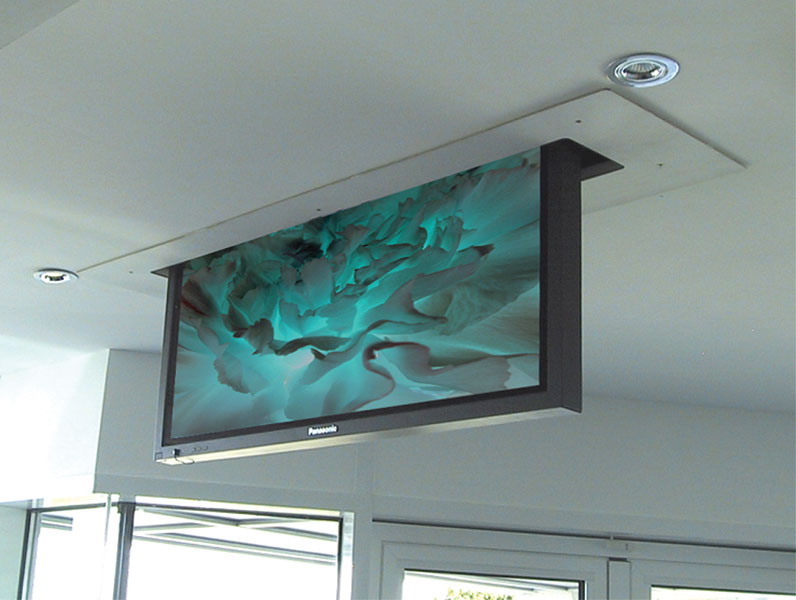
Upon our arrival, one of our staff member noticed that the smart phone was having hard time holding onto the WiFi network. He knew this because usually when the WiFi router does not have Internet connection, the smart phone automatically does not connect. So here’w hat we did. Step 1: We checked all cables and connections, but all connections was solid. All lights showed activity, and corresponded correctly to the expected colors and blinking patterns. Step 2: We power cycled the router, but to no avail. Step 3: We checked the modem by connecting our laptop directly into the modem Internet worked right away. So, how come the router can’t connect? Step 4: We asked the client if anyone else came over and modified the configuration set-up. To this the client replied, “No one came to change anything. But my nephew did come over last week and stayed a few days with me” We followed up with another question, “Did he do or add anything to the system?” To which she replied “I don’t know.” Our staff then asked if it was OK for us to poke around the house and the room where her nephew stayed. After entering the room, we immediately saw an old Apple Express device, which must have been at least 5 yrs old. The color of the blinking light was orange. We immediately unplugged it, then went on to power cycle the entire system once more. The system came back online and Internet connectivity for the home network was live again. Apparently her nephew wanted to create his own VPN, but forgot to take it with him. LESSON LEARNED OF WIFI ISSUE: PROBLEM AND SOLUTIONAs technicians, we must ask all pertinent questions as to any added equipment in our system. We must not only make sure we do a perfect job of installation, but also inform and educate the client. Have you wondered why apple products and PC based products don’t get along well? Is it because Apple router system typically create its own network Gateway/DNS within 10.0.0.0/8 network, and PC’s with 192.168.0.0/16 network? The default settings may have been the root cause of the problem.  We started a new project last week. A client called to see if we mount and connect custom motorized TV lift on concrete ceiling. I was interested from the beginning as she told me this was going to be done on a concrete ceiling . What’s more challenging, she warned that the property did not have ceiling access. It’s actually a 10 story condo in Santa Monica! Awesome! Something new to add to our collection of unusual installation list! OBJECTIVE: MOUNT A MOTORIZED TV LIFT ON CONCRETE CEILING Here were our list of challenges:
Pictures will follow as we finish this one up. Cinema Systems is excited to do this type of installation work, as it’s new an unusual. We usually install them in high ceilings with wood/steel framework. As we always say, challenge is the spice of life!  WHAT IS HOME THEATER?
How much does home theater cost? Well before we answer that, just what is home theater? A home theater is a theater worked in a home, intended to copy (or surpass) the real movie theater experience. Today, many home theaters offer a genuine “film encounter” at a private home. Media rooms, regularly alluded to as home theaters, are amusement set-ups that try to replicate movie theater video and sound experience in a private home. Presently, more individuals are transforming their common TV rooms into home theaters. This used to include a projector and a screen, and it was excessively costly for a great many people. Be that as it may, ideas and innovation in the industry have given individuals more options for home theater setups. HOW MUCH DOES HOME THEATER COST? So now we’re ready to answer, how much does home theater cost? The cost of a home theater can go from $199 to — well, whatever your budget is! To evaluate the cost of a home theater, first consider your necessities. All you may require is an all in one home theater system for under $200, yet other individuals may need much more. Get a thought of what you can spend by referring to the table at the bottom. It’s sorted out by list of sound/video (A/V) components in your home theater. (Sound sources are gadgets that give sound just playback in your home theater framework, while video sources give video or TV content.) The A/V framework gives the control to your home theater. This means it lets you select what you need to watch or listen to, and does all the truly difficult work as far as sending sound to your speaker system. The video part, obviously, is the thing that you watch the media source from. The table also lists some optional components — gaming systems and HTPC (home theater personal computer). This lets you use a PC as a high-quality audio source device, or video source device, or both. Home Theater Cost TableHome Theater Role Device Example Price Audio sources $50 ~ $250 CD player/recorder $50 ~ $600+ Turntable $100 ~ $5,000+ AM/FM tuner $200 ~ $1,000 Satellite radio tuner $75 ~ $300 Video sources DVD Player $50 ~ $1,200+ Blu-ray disc player $300+ VCR $50 ~ $300 Personal video recorder $0 ~ $700 ($0 “payment” when leased as part of a service) Satellite TV receiver $0 ~ $500 Computer/gaming $100 ~ $400 Home theater PC $800+ A/V system All-in-one systems $200 ~ $3,000+ A/V receiver $200 ~ $4,000 Controller/decoder $800 ~ $5,000+ Power amplifier $500+ Speakers Center, left, right, and surround speakers $150 ~ $10,000+ Additional surround-sound speakers $100 ~ $5,000+ Subwoofer speakers $150 ~ $5,000+ Video display Up to 73-inch rear-projection TV $1,000 ~ $4,000 Up to 120-inch front-projection TV $1,000 ~ $15,000+ 32- to 60-inch plasma or LCD flat-panel TV $500 ~ $10,000+ Portables Portable MP3 player $50 ~ $350 Portable video player $100 to $500 Car system Car PC $800 to $2,000 Accessories Speaker and A/V interconnection cables $50 to $1,000+ Surge suppressor/power conditioner $20 to $1,500 Home media server $1,000+ Internet media access devices $100+  REMNANT OF THE PASTA few of our team members walked into a system installation today. We were swapping out the old with the new. To our surprise, the Client had several components that actually lasted for 20+ years! We have to admit, we are impressed that there are still products that stand the test of time. The item that we’re speaking of were the Adcom multi-channel amplifiers. Our team removed the old 20+ year old Lexicon pre-amp, which burned out due to power surge. Instead, we installed a new Marantz AV7703 as drop-in replacement.
To our surprise, the old amps just fired up immediately. It played beautifully through some tower speakers that were also 20+ years old. It’s just too bad that not much new products these days, are of high quality at a reasonable prices. Remember folks! If someone says you have to change your old multi-channel amplifiers just because they are old, get a second opinion from someone who is willing to be honest. Don’t fall for people who just see you as a dollar sign. 
 WALL-IN COMPARTMENTNext, our team built custom hidden compartments so that the game consoles don’t become an eye sore. Instead, the game consoles are hidden but functional through wireless connections.  CEILING PROJECTORLastly, our staff built a custom ceiling projector screen, which was also recessed in. With the magic of the remote, it easily rolls out and rolls back in, giving the client the viewing pleasure option of flat screen TV and projector screens.   Needless to say, the client was very happy with the results.
 PROJECTOR SCREEN WINDOW The project involved building out a custom projector enclosure from the ceiling, and mounting a custom projector screen over the window. This was the result of bouncing some ideas back and forth with the client. The client’s home had stunning views, and sat high up on the hills where no blinds or curtains were needed. Thus, we selected one of the windows facing North the the location to mount the projector screen. Facing North was important because we did not want the heat or light to cause damage to the screen, We also did not want to affect the viewing experience during daylight, which is often times the problem when you decide to place a projector screen over the window. SO LET US TAKE YOU ON OUR JOURNEY BELOW. First, we installed a our remote controlled projector screen over the window.
We accentuated the would be screen area with six surround sound speakers, embedded into the walls. And as you can see below, we clean up after ourselves. After all, our job is build you the best home theater experience, not make a mess.
Here is the build process of our custom enclosure piece. We did all the wiring work from the attic as well.
We installed functional stage lights to complete the home theater experience.  The end result is beautiful and stunning. What a great venue for hosting parties and the ultimate home theater experience. Hope you enjoyed the blog!
 Home Theater ChairsIf you have the space for them, home theater chairs adds functionality and style to complete your media room. Such is the case here, as the den was converted to a full blown media room, with home theater seating and 5.1 surround sounds embedded on the walls. Top of the line Bose speakers were used to ensure a true 5.1 experience.
The typical home theater seating configuration consist of three chairs. You can purchase the chairs individually and place them side by side, or purchase the one that comes pre-attached. There’s more flexibility with the individual chairs, but it really comes down to your own preference. If the space is big enough to have multiple rows of home theater chairs, the second row must be elevated. We build custom platforms matching any fabric or decor, so this can be easily accomplished. When clients ask us for our recommendation on chairs, we consider three things. Comfort, size of the TV screen, and price. Comfort is the most important factor, everything else is secondary. There are many brands you can choose from. There’s Berkline, Palliser, Jaymar, and Seatcraft. Over the years, we have found our clients mostly go with Berline or Seatcraft. These companies have been around for a long time, and they’re known for their quality. Berkline has a loyal following, and Seatcraft are more popular for contemporary ambiance. Other AccessoriesAs for the rest of the media room components, we installed center console to control the projector screen and the sheers for the TV, like a real movie theater. Not to anyone’s surprise, the client did not want any wires showing, so we ran all the cables through the dry-walls and the ceiling where appropriate. When we do such work, we do it by code. Not doing things by code can create fire hazards and cause more damage than good. |
Cinema SystemsBlog articles generated by our staff related to custom home theaters and smart homes. Archives
July 2026
Categories |


 RSS Feed


About UsWith 35 years of experience and 23 years in the same location,Cinema Systems offer professional home theater installations for 1000’s of commercial and residential clients.
Bureau of Electronic and Appliance Repair (B.E.A.R) License #e90231 |
Services We Offer
|
Cities We Cover |
Official RTI Dealer
|